


How to Shoot Photo & Video
at a Corporate Event
Everything you need to capture keynotes, candid moments, b-roll, and a highlight reel your client will actually use.
Quick AnswerTo shoot professional photo and video at a corporate event: (1) do a thorough pre-production walkthrough of the venue, (2) use at least two camera angles to cover keynotes, (3) capture candid b-roll of attendee interactions, (4) record all audio by plugging into the soundboard, and (5) deliver edited content within an agreed turnaround. Planning before the event is what separates forgettable coverage from content that actually gets used.
1. Pre-Production Planning
Great corporate event coverage starts days before you ever pull a camera out of your bag. The more you know about the event’s structure, venue, and goals, the better the final product will look… and the smoother the shoot day will feel.
Walk the Venue Before the Event
Visit the space at the same time of day the event will be held. Check where natural light falls, identify low-light areas that will need supplemental lighting, and scout power outlet locations for charging or running lights. Take test shots with your phone. Note any architectural challenges… low ceilings, windows behind stages, or cramped aisles… so you plan around them instead of reacting on the day.
Get a Detailed Run-of-Show
Ask the event coordinator for a minute-by-minute schedule: when doors open, when keynotes start, meal breaks, awards, breakout sessions, and wrap time. Map your shoot positions to each segment. Knowing that the CEO’s keynote runs 20 minutes at 10:15 AM means you can be locked and loaded at the front of the room at 10:10… not hunting for a tripod spot mid-speech.
Understand the Deliverables
Align on what the client actually needs before you start shooting. A trade-show recap reel for social media requires very different coverage than a documentary-style record of a company’s annual all-hands. Get answers to:
- What platforms will the content live on? (LinkedIn, YouTube, the company intranet?)
- Is there a highlight reel? If so, how long?
- How many final edited photos do they need?
- What is the turnaround deadline?
- Are there any speakers, sponsors, or moments that must be captured?
Pro TipCreate a shot list and share it with the client for approval before the event. It forces alignment, prevents “why didn’t you get a shot of the award presentation?” surprises, and gives you a checklist to run through on the day.
2. Essential Gear for Corporate Event Coverage
You don’t need the most expensive equipment… you need the right equipment for the environment. Corporate events are typically unpredictable, mixed-light, fast-moving situations. Gear that works well in those conditions is what matters.
Camera Bodies
Bring two camera bodies minimum — one for photo and one dedicated to video, or two video bodies for a multicam setup. A camera with strong low-light ISO performance is ideal. Corporate venues often have mixed tungsten and fluorescent overhead lighting, so good shadow recovery in post is essential.
Lenses
- 24–70mm f/2.8 — your workhorse for keynotes and panels
- 70–200mm f/2.8 — for capturing speakers from the back of the room without disturbing the audience
- 35mm or 50mm f/1.8 — fast prime for candid, available-light moments at cocktail hours or breakouts
- 16–35mm f/2.8 — wide establishing shots of the full room or venue
Lighting
Avoid on-camera flash for a majority of the event… it kills ambiance and distracts speakers. Instead, rely on fast lenses and high ISO. For smaller breakout rooms or interview setups, a portable LED panel gives you soft, controllable light without a full kit. If the client approves it, one or two softbox lights set off to the side of a stage can dramatically lift a dark venue.
Support & Accessories
- Sturdy fluid-head tripod for locked-off keynote shots
- Monopod for mobility during b-roll
- Extra batteries (double what you think you need)
- Multiple memory cards… never shoot to one card only
- Gaffer tape, cleaning cloths, multi-tool
3. Shooting Photos at a Corporate Event
Corporate event photography serves a practical purpose: it gives the company visual assets for press releases, LinkedIn posts, internal communications, and future marketing materials. Every frame should be intentional and usable, not just a record that something happened.
Camera Settings for Event Photography
-
Shoot in RAW. You will need the latitude to recover highlights from stage lighting and lift shadows in poorly lit corners. JPEGs leave you with nothing to work with when the exposure is off.
-
Set a minimum shutter speed of 1/200s for speakers. Any slower and you risk motion blur from hand gestures. Use Auto-ISO to compensate.
-
Meter for the subject’s face. Stage lighting is designed to look good from the audience… not from behind a camera. Spot meter on the speaker’s face and bracket if necessary.
-
Use continuous autofocus. Speakers move. A good eye-tracking AF system on a modern mirrorless body keeps your subject in focus even when they lean forward or turn to a slide.
-
Shoot in bursts for award moments. When someone walks to a stage, shakes hands, and holds up a plaque — burst mode ensures you get the peak expression. Edit down later.
Key Moments to Capture
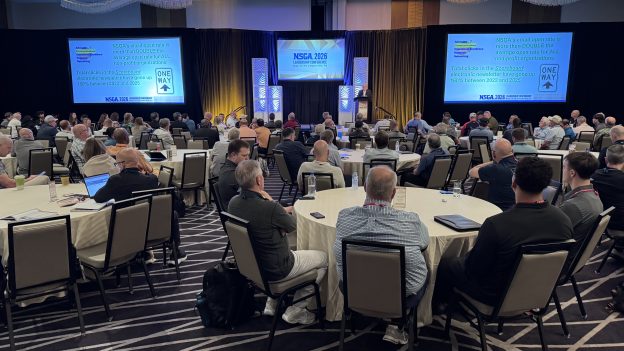
- Wide shot of the full room at capacity before the first keynote
- Speaker portraits: both addressing the audience and close-up expressions
- Audience reactions… laughter, engagement, applause
- Award or recognition moments
- Networking and candid mingling during breaks
- Branded signage, stage backdrops, sponsor walls
- Product demos or booth interactions if applicable
- Executive and team group photos (schedule these… they don’t happen organically)
Framing TipFor keynote speakers, vary your framing between wide shots (speaker + screen), medium shots (waist up), and close-up portraits. A single focal length and distance gives clients nothing to choose from. Variety is what makes an edit strong.
4. Capturing Video at a Corporate Event
Video is where corporate events live or die in the archive. A well-shot highlight reel becomes a recruiting tool, a LinkedIn campaign anchor, and a board presentation asset. Poor video… shaky, dark, inaudible… gets shelved immediately.
Camera Settings for Event Video
-
Shoot in 4K, deliver in 1080p. The extra resolution gives you crop flexibility in post, which is invaluable when you need to punch in on a speaker’s face in a locked-off wide shot.
-
Use the 180-degree shutter rule. Set your shutter speed to double your frame rate (1/50s for 25fps, 1/60s for 30fps). This gives natural motion blur. Break the rule deliberately for slow-motion segments.
-
Shoot in a flat/log profile if your camera supports it. S-Log, C-Log, and F-Log preserve more dynamic range for color grading, which is essential in mixed-light venues.
-
Lock off at least one camera on a tripod. Clients always want a clean, stable master shot of the main stage. Your second operator can go handheld for coverage and b-roll.
Multi-Camera Setup
Ideally, cover any keynote or panel with two cameras: one wide master on a tripod at the back of the room and one medium shot on a monopod that an operator can move as needed. This gives you editorial options in the edit… cutting between angles makes a 45-minute keynote feel dynamic in a 3-minute recap.
If budget allows, consider a third camera on a gimbal to capture smooth walking shots of attendees entering, networking, and moving through the venue. This b-roll becomes the connective tissue in your edit.
5. Audio — The Element Most Often Underestimated
Bad audio destroys good video. It is the single most common failure point in corporate event coverage. Audiences will forgive slightly soft focus or shaky framing before they will sit through muffled or echo-laden speech.
Your Audio Options, Ranked
-
Direct feed from the venue’s audio board (best). Ask the AV team if you can plug in via XLR (or use a Zoom H5, Tascam DR-40) directly into the house mix. This gives you clean, processed sound regardless of where you’re filming.
-
Wireless lavalier mic on the speaker (excellent). A Rode Wireless GO or DJI Mic clipped to a lapel gives you broadcast-quality close-up audio. Essential for one-on-one interviews or panel discussions at small tables.
-
Directional shotgun mic on a boom or camera (acceptable). Works well for ambient sound capture and b-roll narration. Less reliable for keynotes in large, reverberant rooms.
-
Camera’s built-in mic (last resort only). Fine for a rough guide track to sync in post. Never rely on it as your primary audio source for deliverables.
Audio ChecklistAlways record a backup audio source simultaneously. If your board feed drops, you want the shotgun mic running as insurance. Test levels 30 minutes before the first session, not 30 seconds before.
6. B-Roll Strategy: What Separates Good from Great
B-roll is the footage that plays under narration, music, or quote overlays in your edit. It’s what transforms a talking-head video into something that feels produced. Inexperienced event videographers get wrapped up filming the main stage and neglect b-roll entirely… then struggle to build a compelling edit.
Essential B-Roll Shots to Capture
- Attendees arriving and registering at the entrance
- Hands shaking, name badges being scanned, coffee cups picked up
- Wide and tight shots of people engaged in conversation
- Close-ups of branded materials: lanyards, programs, signage, swag
- Audience members taking notes, looking at phones, laughing
- Exteriors of the venue for establishing shots
- Time-lapses of the room filling up or clearing out
- Detail shots: microphones, lighting rigs, event-specific props
Timing Your B-Roll Capture
The safest time to capture b-roll is during transitions: before the event starts, during meal breaks, and at cocktail hours. During keynotes, your attention should be on the stage. Use a second shooter dedicated to b-roll during the main program if budget allows… it is money extremely well spent.
7. Editing & Delivery
The edit is where all your careful shooting pays off… or where poor planning reveals itself. A well-organized media structure speeds up the entire post-production process and reduces the chance of missing client deadlines.
Organize Before You Edit
-
Ingest and back up all media immediatel: ideally on two separate drives before you leave the venue or the day you return home. The cost of a second drive is nothing compared to losing an entire event.
-
Create a folder structure: RAW files → primary footage → b-roll → audio → graphics. Label everything by segment (Keynote_01, Awards, Networking, etc.).
-
Sync multicam footage first: using audio waveforms (Premiere Pro’s auto-sync or PluralEyes). Do not start cutting until all cameras are aligned.
Photo Editing Workflow
Sort your selects in Lightroom using a star or flag system. For a full-day corporate event, plan to deliver 100–250 edited images. Over-delivering unedited dumps erodes the perceived value of your work. Cull aggressively, edit consistently (especially white balance across the same session), and export at appropriate resolutions for both web and print use.
Video Editing Workflow
For a highlight reel, aim for 2–4 minutes for LinkedIn/YouTube and 60–90 seconds for Instagram or in-event recap screens. Structure it as: opening energy (wide shots, arrival, room atmosphere) → key speaker moments → audience engagement → closing call-to-action or branded close. Music selection sets the entire emotional tone — choose it before you start cutting.
Delivery Formats
- Photos: high-res JPEGs for print, web-optimized JPEGs (2048px) for digital, via shared Google Drive or WeTransfer
- Video: H.264 MP4 for web and social, ProRes or H.265 master file for archival
- Include both square (1:1) and landscape (16:9) crops of key images for social flexibility
- Provide captions or a key for images if the client needs to identify speakers by name
Delivery TipSend a small preview gallery of 10–15 photos within 24 hours of the event. Clients share these on LinkedIn while the event is still fresh — and it builds enormous goodwill before the full delivery arrives.
Frequently Asked Questions
How many photographers and videographers do we need for a corporate event?
For events up to 150 attendees with a single stage, one experienced photographer and one videographer can manage coverage well… especially with a clear shot list and run-of-show. For larger multi-session conferences, award galas, or events with simultaneous breakout rooms, a two-photographer and two-videographer team is strongly recommended. Under-staffing a large event means missed moments that can never be recreated.
What is a reasonable turnaround time for corporate event photos and video?
Industry standard for edited photos is 30 business days. A highlight reel or recap video typically takes time depending on length and complexity. Discuss turnaround expectations before the event and confirm them in writing. Rush delivery is often available for an additional fee… worth it for events tied to time-sensitive press or social campaigns.
Do we need to get permission to photograph attendees?
Best practice is to include a photo/video release notice in the event registration process and/or in the event program. This is especially important for events that are not internal-only. For large public conferences, a clear signage notice at entry is common. If specific individuals object, respect that and ensure your team is briefed on who is off-limits before you shoot.
How do you handle low-light corporate event venues?
We rely primarily on fast lenses (f/1.8–f/2.8), modern mirrorless sensors with strong high-ISO performance, and — where venue rules and client aesthetics permit… portable LED panel lights in targeted areas. Flash is used sparingly and only when it won’t disrupt speakers or the event atmosphere. In truly extreme low-light situations, we always discuss supplemental lighting options with the client and AV team in advance.
What’s the difference between event photography and event videography pricing?
Photography pricing typically reflects the photographer’s day rate plus post-production editing time and the number of final delivered images. Videography is generally priced higher because post-production is significantly more labor-intensive… color grading, audio mixing, motion graphics, and music licensing all add time and cost. Always request an itemized quote so you understand exactly what is included.
Can ROF Industries handle events outside of Orange County?
Absolutely. ROF Industries is a travel-ready production team. We’ve covered events and commercial shoots across Southern California, across the U.S., and internationally. Travel logistics, rates, and expenses are discussed upfront so there are no surprises… we’re here to make the process seamless wherever your event takes you.
Covering an Upcoming Corporate Event?
ROF Industries is Orange County’s trusted photo and video production team. We handle everything from pre-production planning to final delivery — so your team can focus on running a great event.